CVP Model in D365 F&O
As a Cost & Management Accountant, navigating the intricacies of costing can feel like a high-speed race against time. There's so much to discuss about costing mechanisms, but amidst the flurry of ongoing activities, it can be challenging to find the time.
Let's delve into an intriguing feature within Dynamics 365 concerning price models in sales orders.
Determining the sales price of a product is no simple feat. For cost controllers, it's often a daunting task to meticulously track all direct, fixed, and indirect costs associated with a product. While ERP systems can provide valuable insights, they often fall short when it comes to incorporating market analysis and other influential factors.
Indeed, factors like market demand and supply wield significant influence over pricing strategies for items. In the realm of cost accounting, two key concepts come into play: markup and margin. These serve as guiding principles for establishing sales prices based on various assumptions.
So, how can we leverage margin within D365 to streamline pricing strategies? Let's explore.
Set-up
- Go to release Product and open the Item.
- Go to the Sales tab and you will find this model.
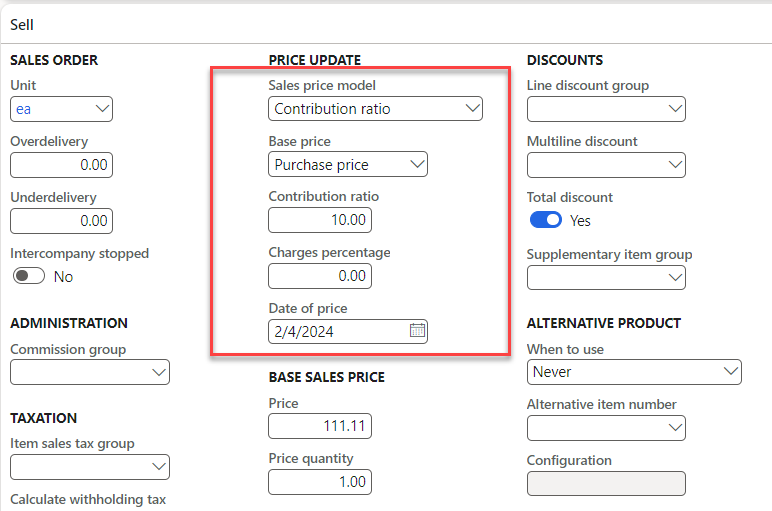
- Initially it will have the sales price model as None, and later you can setup it with CR or Charges %.
- So, normally in trading business we just by the items and sell them but in complex business cases such as retail & Manufacturing concerns it’s difficult to assume and setup the sales price accurately.
- Let say I buy an item in 100 USD and I have only variable cost for that item of 100 USD, there is no fixed cost for the item so If I sell the item in 100 rupees even my Break-even point will be achieved.
| Break Even Analysis | Break Even Analysis | Break Even Analysis | Break Even Analysis | Break Even Analysis |
|---|---|---|---|---|
| Sales Price | 100 | |||
| V.C | 100 | |||
| Margin | 0 | |||
| F.C | 0 | |||
| Revenue | 0 | |||
| CM % | 0 |
- But once it comes to complex cases where I also have fixed costs and indirect costs it’s not possible to achieve this easily.
- So in those case to when costing department calculates the Break-even and set’s the margin ratio then this price models comes into effect, you can just put the margin ratio and system will calculate the price accurately.
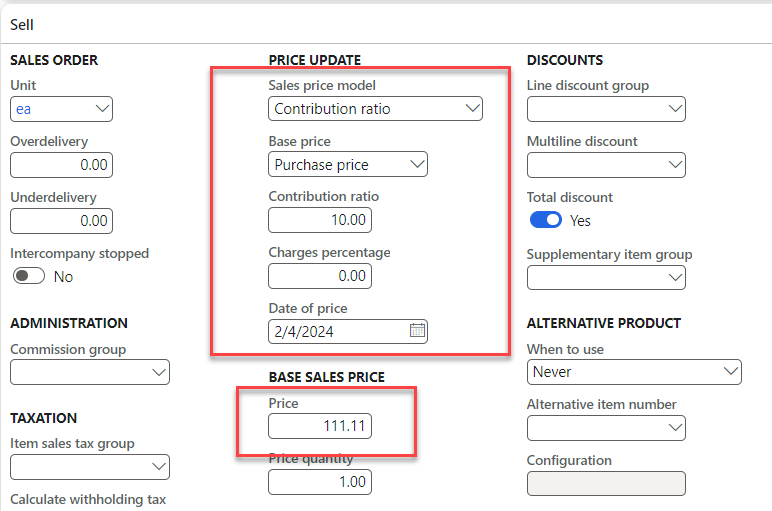
- D365 Uses this formula to calculate the price using this Model.
- (cost price * 100) / (100 – contribution ratio).
- My cost was 100 and want to apply the margin of 10% system has automatically calculated my sales price based on this.
Effective Tips:
- You can use this based on the Cost price & Purchase price both.
- Based on the business case you can decide whether you want to use the cost price or purchase price.
- To get the more efficient result use it with the latest price toggle on.
- If you have any trade agreement with the customer, the system will override this price and will show a variance in cost analysis.
- Decide with the Internal costing team to perform CVP analysis in detail before considering this.
- Happy learning….